You Are Here:Home > Solutions  > Consumer Electronics

Bluetooth device UI button test

Project Overview

With the widespread adoption of Bluetooth earphones in the market, users' expectations for their functionality and experience are also continuously increasing.

Bluetooth earphones need to provide not only a high-quality audio experience but also convenient and reliable control features.

The buttons on the earphones perform multiple key functions, including playing/pausing music, adjusting volume, answering/ending calls, and activating voice assistants. The design and performance of these buttons directly affect the user experience.

Therefore, Bluetooth earphone button testing is not only part of product quality control but also an essential step in enhancing user experience and ensuring product competitiveness.

An Introduction

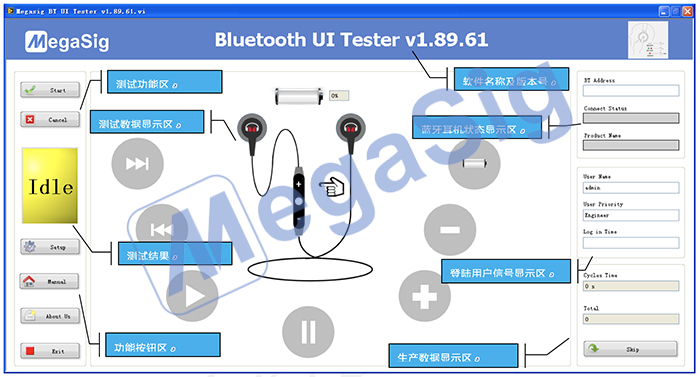
Software Interface:


Software functions:

  • Previous, Next button;

  • Volume up, Volume down button;

  • Play, Stop button;

  • Answer, Mute button;

  • Power Check;

  • RSSI Check;

  • BT Name Check;

  • BT Model Check;

  • BT Address Length Check;

  • Loop Mode Check.


Configuration List

Summarize

In summary, by testing the UI buttons with MegaSig equipment, it ensures that Bluetooth earphones have a comfortable feedback and sensitive response. Achieving product differentiation in the competitive red ocean market through excellent button experience enhances brand image and user retention, ensuring that the product remains competitive in the market.


Video:

How to configure AudioExpert to realize UI test